


Recent updates have been introduced to DJI Enterprise products starting with the DJI Mavic 3 Enterprise Series. New features include slope missions, linear routes with adjustable heights, vision assistance and more, let's take a look.
Gather Accurate and Precise Data of Slope Surfaces
Updated Software: Pilot 2 and FlightHub 2
Supported Hardware: Mavic 3 Enterprise Series
When conducting a mapping mission for a slope surface or a building facade, it can be difficult to maintain a constant GSD (Ground Sample Distance) and overlap. The new slope mission feature added to DJI Pilot 2 and FlightHub 2 is designed for millimeter-level GSD acquisition of sloped surfaces, making it easier for pilots to complete their tasks.
How to create a slope mission on Pilot 2:
- Click Flight Route
- Click + on the top right
- Select Create a Route
- Select Slope Route
- Fly your drone out press C1 to snap the target surface of the slope.
- Adjust the border of the surface to cover only what you want to inspect.
- Adjust the slope surface parameters according to the existing GSD and relative distance to the surface.
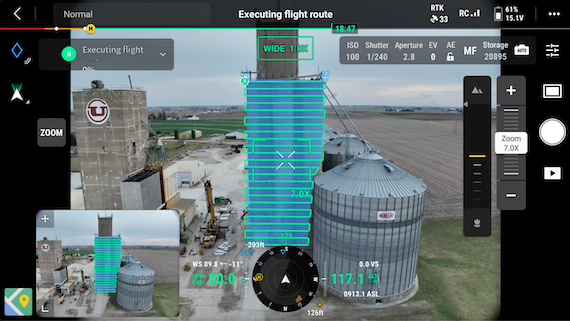 Slope mission on Pilot 2
The pilot used a Mavic 3E to create a detailed model of a grain facility using a GSD of 1cm. Once the model was generated, it was uploaded to FlightHub 2, which processed the data into a local rendering. This rendering provided a clear and accurate depiction of the current state of the grain facility.
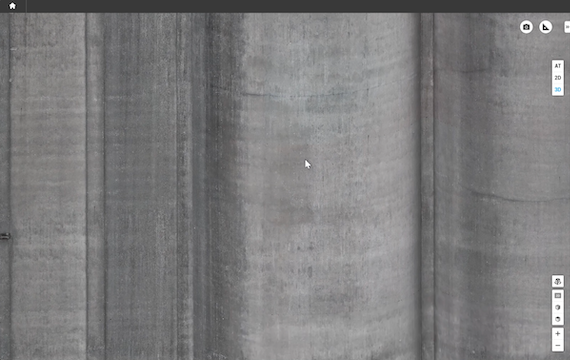 Detailed image of grain facility's facade
When using DJI Pilot 2's slope mission feature, Mavic 3E Series drones can reconstruct facades by displaying the distance from the target. This information can then create a surface to be surveyed, thus generating the flight path for a drone.
Note:
- Real Time Kinematics (RTK) must be enabled during the planning and operation of slope missions.
- If the distance to the surface cannot not recognized, try flying the drone around the location to get more spatial information.
Perform Linear Flights Suitable for Transmission Lines
Updated Software: FlightHub 2
Supported Hardware: Mavic 3E Series, Matrice 300 RTK, Matrice 350 RTK, Matrice 30 Series
A new feature has been added to DJI FlightHub 2 which supports linear flights with adjustable heights. Users can control their drone to mark points near targets and string them together in a line to create a flight path. These points can then be used to guide drones through transmission line inspections across rugged terrain.
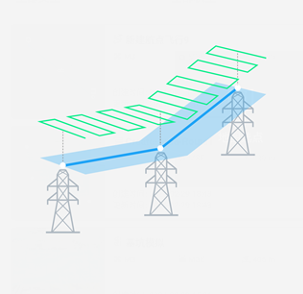 Flight path above transmission lines
- The blue line represents the target connection between each transmission tower.
- The light blue area highlights the general area that needs to be inspected.
- The green line represents the drones actual flight path.
New Flight Settings Added to DJI Pilot 2
Updated software: DJI Pilot 2
Supported Hardware: DJI Mavic 3 Enterprise Series
New flight settings have been added to assist your drone returning to its home point and land. You can access these settings in Pilot 2 by going to: Flight Settings < Assist Menu < Show AR Return-to-Home Route < Show AR Landing Point < Vision Assist.
If you enable the "Show AR Return-to-Home Route" feature on your drone, it will automatically adjust the gimbal's tilt angle so that the camera is facing in the direction of its home location. When these settings are enabled the camera will display the AR Home Point and AR Return-to-Home Route. This feature helps you to see any obstacles and provides an overview of the home point and its route for returning home.
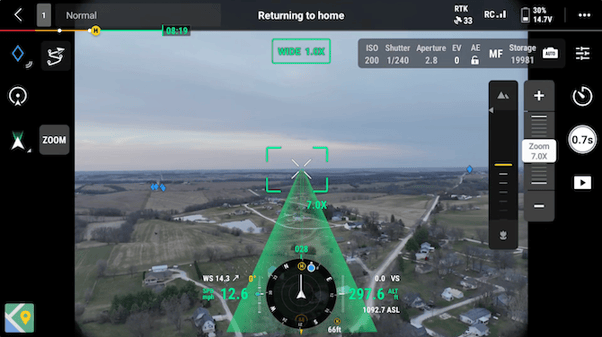 The green layout is the drone's return-to-home route
When "Show AR Landing Point" is enabled, the camera will display the landing area once the drone's sensor detects the ground.
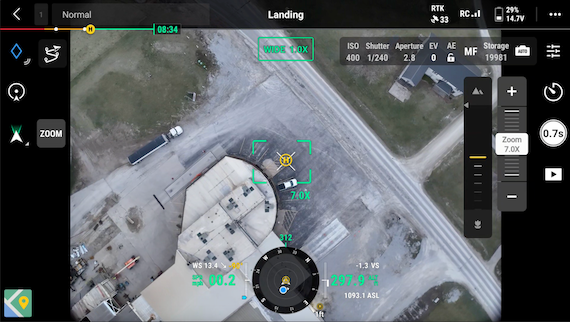 The yellow circle is the drones home landing area
When "Vision Assist" is enabled, the horizontal omnidirectional vision system creates a 360-degree view of the drone, helping pilots identify potential obstacles while flying. Note that the image resolution may be affected due to service bandwidth restrictions or a lower image resolution on the remote controller.
Software Update Recap
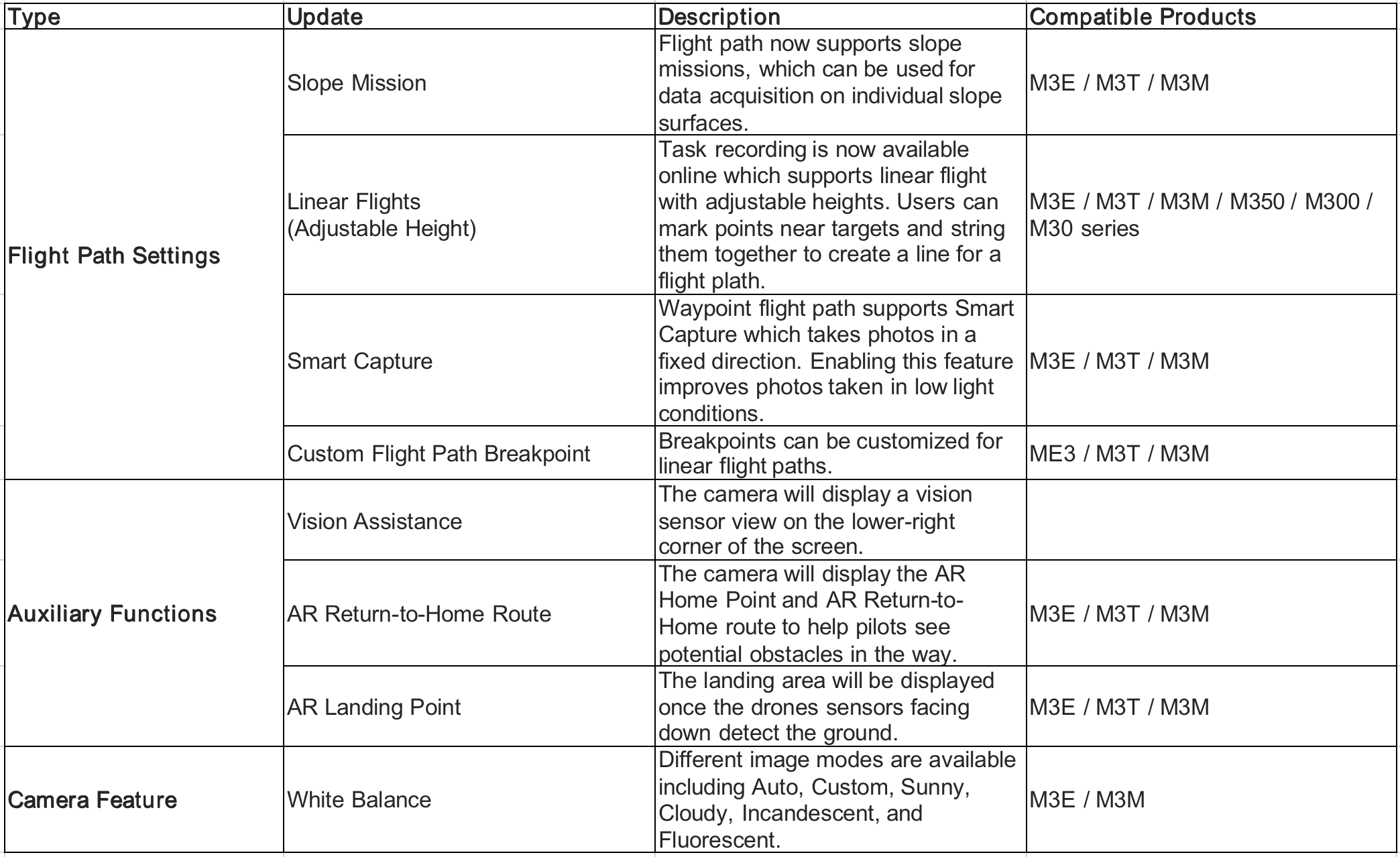
Fore more information about DJI FlightHub 2, click here.
For more information about DJI Mavic 3 Enterprise Release notes, click here.

-1.png?width=300&name=DFR%203%20(3)-1.png)
.png?width=300&name=DFR%202%20(3).png)
